Following the announcement of triple screen and VR support, many sim racers were even more excited for Assetto Corsa EVO. However, while VR is indeed on board as of the first Early Access release, it leaves a lot to be desired.
We've been over this countless times: There is no better immersion for sim racing than VR, as most sim racers will agree to. As a result, Kunos Simulazioni's announcement that Assetto Corsa EVO will support Virtual Reality on its first Early Access launch already saw many in the community very happy - VR was one of the main reasons why the Italian studio decided to ditch Unreal Engine and create its own one instead again.
As someone who has very much fallen in love with sim racing in VR over the last year or so, I had to check out AC EVO in this mode, of course. How does it perform, how easy is to get into, and most importantly, can I recommend VR already? Here's what I found.

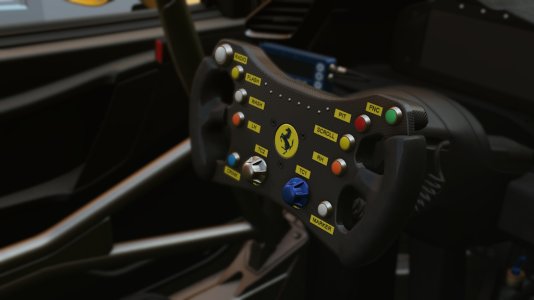
Cockpits in AC EVO are recreated in a lot of nice detail.
This allowed me to set up image scaling and Foveated Rendering options without problems. Expecting that I would have to make more visual compromises than in other titles, I tried my best to find something usable. What was nice to see is that you can move the HUD closer or further away by simply pressing the up and down arrow keys, so you will easily find the right distance after booting up the game.

Details like the raindrops on this Ferrari 296 GTB are taxing on monitors already.
While some users have reported that they managed to extract an enjoyable experience out of their setups, I could not do the same even though my PC should be more than capable of doing so. For reference, and as in my first impressions article, here are my hardware specs:
Unfortunately, even with low graphics settings in the game and a lot of upscaling set in OpenXR Toolkit (which usually leads to an image with a lot of shimmering edges the smaller you make the image render originally), I could hardly manage to get more than 80 fps. The problem was that even that was far from stable, and in a single-car session at noon, too.
As a result, the whole experience felt not very fluid, and even though I do not have any problems with motion sickness, I felt like that might change if I carried on for longer. The other issue was the graphics themselves.

Of course, this is only two experiences of many. As mentioned earlier, others have reported that they have an enjoyable time in Assetto Corsa EVO in VR. And considering the discrepancy in performance on screens the community reports, I would not say it is impossible. Some have a hard time getting AC EVO to run decently on a monitor, others have zero problems at all - again, it seems very dependent on the setup the game runs on.
To improve VR performance, Kunos suggests launching the game, setting graphics to 'low' and then reboot. Then, you can dial up the graphics again - as stated, this solved the VR performance issues for some. Unfortunately, it did not work on my end.
If you are interested in the game in general and would also be fine with running it on a monitor, I do recommend giving it a go in VR - you might be among those who can get good performance out of it without problems.
However, if you have long bid farewell to screen-based sim racing and are firmly in the VR-only camp, then my advice is to not jump on the AC EVO train just yet. Of course, you could also use the refund option on Steam to try and see if you can get it to work. Otherwise, checking back when 'Stage 2' of the game's VR implementation is here might be the better option.
Once AC EVO is better optimized, though, I can see it become excellent in VR. There is no doubt that the interiors of the cars are very well recreated down to the smallest details. So much so that I did enjoy looking around the Ferrari 296 GTB's cockpit for a few minutes despite the graphics being not exactly tolerable - you could tell that there was something very nice hiding behind a rather pixelated and aliased curtain.
And once that curtain is lifted, Assetto Corsa EVO in VR might well take off big time.
What have your experiences in Assetto Corsa EVO in VR been like? Let us know in the comments below, and feel free to share your settings as well!
We've been over this countless times: There is no better immersion for sim racing than VR, as most sim racers will agree to. As a result, Kunos Simulazioni's announcement that Assetto Corsa EVO will support Virtual Reality on its first Early Access launch already saw many in the community very happy - VR was one of the main reasons why the Italian studio decided to ditch Unreal Engine and create its own one instead again.
As someone who has very much fallen in love with sim racing in VR over the last year or so, I had to check out AC EVO in this mode, of course. How does it perform, how easy is to get into, and most importantly, can I recommend VR already? Here's what I found.
Cockpits in AC EVO are recreated in a lot of nice detail.
AC EVO In VR: Easy Setup
Right out of the box, Assetto Corsa EVO is compatible with Oculus VR and OpenXR. The latter was good news to me, as my trusty Pico Neo 3 Link benefits from this massively in combination with OpenXR Toolkit and its capabilities for tickling out more performance. Where I had other sims not pick up the Toolkit immediately in the past, for AC EVO, it was as simple as dropping the two .ini files for OpenComposite and the OpenXR Toolkit API in the game's root folder (which, as it turns out, would not even have been necessary, as pointed out by @pcraenme and @dryheat94 - thank you for that!) and firing it up. OpenXR Toolkit worked on the first try - a nice and easy setup.This allowed me to set up image scaling and Foveated Rendering options without problems. Expecting that I would have to make more visual compromises than in other titles, I tried my best to find something usable. What was nice to see is that you can move the HUD closer or further away by simply pressing the up and down arrow keys, so you will easily find the right distance after booting up the game.
Details like the raindrops on this Ferrari 296 GTB are taxing on monitors already.
Assetto Corsa EVO VR Performance
Unfortunately, this is where the positives ended for me - and that is okay, as a 'Stage 2' VR implementation is already on the roadmap Kunos revealed after the launch of AC EVO. It was always clear that VR in this Early Access release would be experimental, although most had probably hoped that it would be easier to run already.While some users have reported that they managed to extract an enjoyable experience out of their setups, I could not do the same even though my PC should be more than capable of doing so. For reference, and as in my first impressions article, here are my hardware specs:
- Intel Core i7 13700K
- MSI GeForce RTX 4080 16GB
- ASUS Prime Z790-P
- RAM: 64GB Corsair Vengeance DDR-5 5200
- Seasonic FOCUS GX-1000
- Dell S3422DWG 34" 144 Hz Curved Ultrawide Monitor
- Pico Neo 3 Link VR Headset
Unfortunately, even with low graphics settings in the game and a lot of upscaling set in OpenXR Toolkit (which usually leads to an image with a lot of shimmering edges the smaller you make the image render originally), I could hardly manage to get more than 80 fps. The problem was that even that was far from stable, and in a single-car session at noon, too.
As a result, the whole experience felt not very fluid, and even though I do not have any problems with motion sickness, I felt like that might change if I carried on for longer. The other issue was the graphics themselves.
Experiences May Vary
I know amazing visuals are nice, but not the most important element of a racing simulation. But the way Assetto Corsa EVO looked even with my time spent tinkering was seriously taking away from the experience - it was not pretty, to say the least. Our Community Manager @Christopher E encountered similar problems, too, reporting significantly higher numbers of dropped frames than in other sims.Of course, this is only two experiences of many. As mentioned earlier, others have reported that they have an enjoyable time in Assetto Corsa EVO in VR. And considering the discrepancy in performance on screens the community reports, I would not say it is impossible. Some have a hard time getting AC EVO to run decently on a monitor, others have zero problems at all - again, it seems very dependent on the setup the game runs on.
Assetto Corsa EVO VR FPS Improvement Suggestion
This extends to a suggested solution that also came up on the official AC EVO Discord server, and it seemed to help some sim racers.To improve VR performance, Kunos suggests launching the game, setting graphics to 'low' and then reboot. Then, you can dial up the graphics again - as stated, this solved the VR performance issues for some. Unfortunately, it did not work on my end.
AC EVO VR: Recommended or Not?
That leaves the question: Would I recommend Assetto Corsa EVO in VR? It depends - but overall, not really.If you are interested in the game in general and would also be fine with running it on a monitor, I do recommend giving it a go in VR - you might be among those who can get good performance out of it without problems.
However, if you have long bid farewell to screen-based sim racing and are firmly in the VR-only camp, then my advice is to not jump on the AC EVO train just yet. Of course, you could also use the refund option on Steam to try and see if you can get it to work. Otherwise, checking back when 'Stage 2' of the game's VR implementation is here might be the better option.
Once AC EVO is better optimized, though, I can see it become excellent in VR. There is no doubt that the interiors of the cars are very well recreated down to the smallest details. So much so that I did enjoy looking around the Ferrari 296 GTB's cockpit for a few minutes despite the graphics being not exactly tolerable - you could tell that there was something very nice hiding behind a rather pixelated and aliased curtain.
And once that curtain is lifted, Assetto Corsa EVO in VR might well take off big time.
What have your experiences in Assetto Corsa EVO in VR been like? Let us know in the comments below, and feel free to share your settings as well!