Assetto Corsa EVO Version 0.2.1 Brings Plethora Of QOL Improvements And Fixes

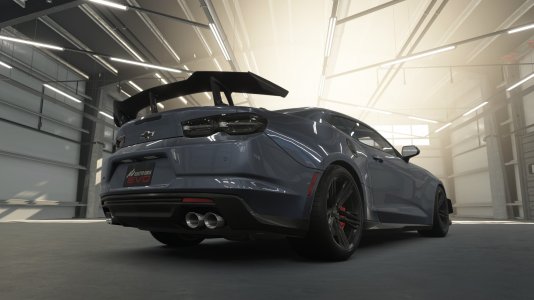
Camaro, Garage.jpg
Image: Kunos Simulazioni
Another week, another Assetto Corsa EVO update. Whilst not a content drop, the new 0.2.1 version builds upon the substantial v0.2 update by introducing critical fixes and enhancements, particularly for VR users and overall performance.

With this fairly substantial patch, could we be seeing the start of a more consistent but smaller update cycle? It could be a one-off thing, given that there were a fair few issues after 0.2, but the idea of a more regularly updated Assetto Corsa EVO would be good for hitting its roadmap marks.


Update 0.2.1 is LIVE for Assetto Corsa EVO!​

Backend
Improved Special Events retrieval time

Graphics
- Visual fixes for the Alfa Romeo Giulia Sprint
- Visual fixes for the Porsche 964 Turbo upgrade parts

Rendering
- Automatically detect and set the texture pool size based on GPU video memory
- DOF can now be disabled from the video settings
- Fixed trees popping on certain track and car combinations
- Fixed triple monitor glitch

UI
- Fixed potential scrambled font issue in Steam builds, round robin update disabled in showroom and when the session is paused to restore frame rate in the car selection showroom - fixed erroneous post remove car focus assignment
- General controller navigation pathfinding behaviour corrections
- Video settings - texture pool size option hidden
- Fix for missing car on thumbnails in some cases after customisation (when apply is chosen after back or when hitting esc after apply)
- Fix for dynamic thumbnails not taking into account showroom position offsets, per-item scrolling in certain scrollable lists (model selection, grid editor, car preset selector)

Gameplay
- Fixed R3-01 Academy event
- Fixed license requirements in the dealership
- Fixed update of dealership licenses after unlocking a new license
- Added error message if the documents folder is not writable
- Updated car prices for 0.2 content
- Stability control is now off by default on all assist presets
- Pit limiter assist is now on by default in all presets, except Pro

Physics
- Fixed out-of-range values sent to the Force Feedback
- fixed erroneous setup limits
- Updates to the Porsche 964 Turbo handling

Audio
- Fixed Alfa Romeo 75 Evoluzione low exterior sound

Ferrari GTB.jpg

Ferrari GTB, Assetto Corsa EVO showroom

Whilst small, the changes that have been implemented are welcomed and clear up some of the more significant problems with the new cars that we at OverTake had found, such as the muffled exterior sound on the Alfa Romeo 75 Evoluzione and the force feedback bugs on the sliders.

What do you think about this latest path to Assetto Corsa EVO? Let us know in the comments down below!
About author
Connor Minniss
Website Content Editor & Motorsport Photographer aiming to bring you the best of the best within the world of sim racing.

Comments

Makes me think these people complaining about FFB have all the AC1 canned effects cranked to the max.
To me they both feel great and have zero complaints about FFB in AC Evo.
I recently moved from a G923 to the Logitech Pro Wheel, where I set it to 11nm of force at the base and 27% gain on AC1 only, and I can tell you that switching from a weaker wheel to a stronger one did not improve my perception of the AC EVO's FFB. The reactions are slow, just like they are on ACC, only after the car is rolling do I feel any countersteering and most of the time the wheel feels disconnected from the car, it offers no resistance when you turn, and I have a real-life car with power steering and I feel much more of anything on it than I do on the AC EVO with a Direct Drive of 11nm of force.
 
Makes me think these people complaining about FFB have all the AC1 canned effects cranked to the max.
To me they both feel great and have zero complaints about FFB in AC Evo.
I don't think we can properly evaluate FFB or even handling to an extent until the tyre model is updated. Curious to see how much of a change TM1 makes in the next update. Also, myself and many others with a G29 are using a custom LUT which makes a difference regarding center deadzone. I hope ACE offers the use of this option in the future. At the moment FFB feels pretty good, I'd like a bit more detail, hopefully that comes as the tyre model improves.
 
They defo watched Jimmys video and changed stability preset lol
It being on by default was a mistake for sure. I'm not entirely convinced on the visibility of the Assists section in the menu right before entering the track. I'd prefer a menu bar at the top of the screen versus a clickable panel.
 
My fps doubled since 0.2. Rain also doesn't tank my fps like the first version.

I used to get 40-50fps with 20 AI cars now it goes to 80-90. Even with the max per track like 35 cars my fps is on 70 and as the cars spread it goes to 90.

I use a mix between low, medium, and high settings.

PC specs: 5600 ryzen, 6700xt, 16gb ram.

I though I had to buy a new pc when ACE early access launched but since 0.2 I don't have to worry.
I'm happy for you boy...
 
;)

Did you try locking 60fps in Nvidia/AMD and setting 60fps in ACE menu ?

That is what I did to get constant 100fps, before I did it was all over the shop.
Also I think people push hardware too hard to get better fps just makes fps unstable.

Like my 7800X3D is running at 1/2
I get 5500 in CPU-Z not 7500
Yet my sims rF2 ( 144) LMU (120) ACE ( 100) all run off their heads rock solid stable any conditions full fields. CPU and GPU never get what I call hot even under 70C everywhere.

As well RTX4080S is stock settings and power for both CPU/GPU is standard windows.

Good Headroom, Go figure ( shrugs )
So,with my system i can get stable 60 fps now in dry with 20 cars with preset medium and Vsync framerate limited to 60 fps in game and Nvidia driver.But rain and or nightime only stuttering 30 fps.
Any advice to make it better?
My system:
Intel Core i7-7700K, 4x 4,2 GHz (bis zu 4,5 GHz, 8 MB Cache)
Asus GeForce ZTurbo GTX 1080 TI 11G
HDD: 240 GB SSD - Kingston SSDNow, 1 TB HDD
16 GB DDR4-RAM, 2400 MHz, Crucial, Windows 10 64-bit Home
Mainboard: MSI H110M Pro-VD, Sockel 1151, Intel® H110 Chipsatz, 4× SATA III (6 GBit/s)
Thrustmaster TS - PC - Racer
 
So,with my system i can get stable 60 fps now in dry with 20 cars with preset medium and Vsync framerate limited to 60 fps in game and Nvidia driver.But rain and or nightime only stuttering 30 fps.
Any advice to make it better?
My system:
Intel Core i7-7700K, 4x 4,2 GHz (bis zu 4,5 GHz, 8 MB Cache)
Asus GeForce ZTurbo GTX 1080 TI 11G
HDD: 240 GB SSD - Kingston SSDNow, 1 TB HDD
16 GB DDR4-RAM, 2400 MHz, Crucial, Windows 10 64-bit Home
Mainboard: MSI H110M Pro-VD, Sockel 1151, Intel® H110 Chipsatz, 4× SATA III (6 GBit/s)
Thrustmaster TS - PC - Racer
Try my recommend settings for you. My gpu and cpu is better than yours (cpu ryzen 5600 and 6700xt gpu) but I prefer a less distracting image with more fps and clarity. Also, almost all settings have a description if you hover the mouse over it. If it doesn't solve, remove the video.videosettings in ACE/Documents folder to get new settings.
Also big mistake is using vsync. Because if you drop below 60 fps, vsync will limit your fps to half of your and introduce visual delay. Better to use the in-game fps limiter.
 

Attachments

  • 20250516153506_1.jpg
    20250516153506_1.jpg
    187.5 KB · Views: 0
  • 20250516153451_1.jpg
    20250516153451_1.jpg
    189.1 KB · Views: 0
  • 20250516153520_1.jpg
    20250516153520_1.jpg
    189 KB · Views: 0
  • 20250516154225_1.jpg
    20250516154225_1.jpg
    183.5 KB · Views: 0
Last edited:
Premium
and what do u think about the ffb :p

Honestly I never bother about it at this stage of a sim's development, like others mentioned tyres can totally change everything, same with any EA title.

...and why i think people giving it 50-70% recommendation in Steam at this stage is just a bunch of emotional try-hards ( shrugs ) ;)
 
Last edited:
Premium
So,with my system i can get stable 60 fps now in dry with 20 cars with preset medium and Vsync framerate limited to 60 fps in game and Nvidia driver.But rain and or nightime only stuttering 30 fps.
Any advice to make it better?
My system:
Intel Core i7-7700K, 4x 4,2 GHz (bis zu 4,5 GHz, 8 MB Cache)
Asus GeForce ZTurbo GTX 1080 TI 11G
HDD: 240 GB SSD - Kingston SSDNow, 1 TB HDD
16 GB DDR4-RAM, 2400 MHz, Crucial, Windows 10 64-bit Home
Mainboard: MSI H110M Pro-VD, Sockel 1151, Intel® H110 Chipsatz, 4× SATA III (6 GBit/s)
Thrustmaster TS - PC - Racer

Well when I first answered you gave no information.
I wrongly assumed you have PC capable of running well above 60fps minimum fps .
My PC will run 140fps + so I set it to 100fps maximum

Setting 60fps in ACE is not enough.
As I already told you go into NVCP and set maximum fps to 60.
Even though you have Vsync on your PC is still working harder because Nvidia is not limited so CPU has to work harder and could be spiking lower fps.

1. Turn OFF VSync
2. Set 60 fps in ACE slider
3. Set 60 fps maximum in NVCP ***

***P.S.
I know you have sims run faster, this is just for test.
Later you can set ACE to 60fps in Nvidia Inspector and set NVCP global higher.

Screenshot 2025-05-17 074331.png


Also I never mentioned turn off vsync, thanks @Radu Oros.

Now with those settings you need to find graphics settings were your fps does not drop below 60.
If it still drops below at your preferred settings I think you know the answer ;)
 
Last edited:
Anyone has tested the VR and knows if something has improved?
Thanks!
VR is the most important for me with ffb!

Cheers i hope ace improves soon ...also would like to test the free world :D
Yes definitively worth it now, I enjoy a lot playing since 0.2
Performances is very good (rtx 4080, every settings at high, except grass OFF and clouds low, MSAA x4, refresh rate 72hz at full res quest3 and it's stable!)
I'm getting in love with this game !
Also ffb is really good, try Maserati GT2 on Bathurst ^^
 
Last edited:
Premium
Personally I think Steam and Studios suck when it comes system analytics.

For instance take S397 and recommended hardware for both rF2 and LMU
Additional Notes: To run on default settings at 1080p ...." Default"
But no one, not one studio quotes possible FPS.

You telling me you can't take a given CPU + GPU with midrange hardware and a fresh W10 or W11 64bit + latest drivers + windows updates and give me FPS details is total bollocks.

I bet I could take 5 hardware combos of same CPU / GPU and run all 5 within a few % of each other.

Like they don't have to guarantee it but at least give you a idea.
@ same settings
1080p@60fps
1440p@60fps
2160@60fps
 
Last edited:
Obviously, it's better in many ways except for my credits ! I lost 300,000 with the update.😳😳
I played the challenge game to buy what I wanted, I won't do it again.😖😖
 

Attachments

  • EVO2.jpg
    EVO2.jpg
    1.1 MB · Views: 0
  • EVO1.jpg
    EVO1.jpg
    1.1 MB · Views: 0
Premium
Obviously, it's better in many ways except for my credits ! I lost 300,000 with the update.😳😳
I played the challenge game to buy what I wanted, I won't do it again.😖😖

Not uncommon for pre release to do this.
Project Cars reset global / user results a few times.
 
Personally I think Steam and Studios suck when it comes system analytics.

For instance take S397 and recommended hardware for both rF2 and LMU
Additional Notes: To run on default settings at 1080p ...." Default"
But no one, not one studio quotes possible FPS.

You telling me you can't take a given CPU + GPU with midrange hardware and a fresh W10 or W11 64bit + latest drivers + windows updates and give me FPS details is total bollocks.

I bet I could take 5 hardware combos of same CPU / GPU and run all 5 within a few % of each other.

Like they don't have to guarantee it but at least give you a idea.
@ same settings
1080p@60fps
1440p@60fps
2160@60fps
Considering ACE is early access, those numbers would likely change with every update. It would make more sense to post this sort of info after the 1.0 release, if at all. Also, given the plethora of hardware combos this could turn into a avalanche support calls when someone's system doesn't hit the posted resolution/fps combo. End user has to do much of the heavy lifting to sort this out. There is a reason why consoles exist.
 
Last edited:
Premium
Yes, that is what I meant v1.0.
I don't know how many system combos studio use to test.
Clearly not enough.
It would require anyone wanting to match fps ( with headroom left ) to do a FRESH OS LATEST DRIVERS WINDOWS UPDATES DX VC BASIC ( included in support ) BUT NOTHING MORE !

Tell me how many people with performance issues do fresh OSes , clean C:\drive ? lol
Only a small % because the rest are too lazy.

Rather then spending 2 hours doing a complete refresh of their tower ready to race ( that's all it takes me ) they post about same issue over and over for weeks ............. zzzzzzzzz
 
Last edited:
If only they could improve the hilariously bad performance too... The game looks no better than my modded AC 2014 but it runs at a fraction of the framerate.
Texture detail and lighting in ACE are light years beyond AC\CSP. Although pending what GPU you have many of these details may not be apparent to you.
 

Article information

Author
Connor Minniss
Article read time
2 min read
Views
5,658
Comments
41
Last update

With WRC leaving EA/Codemasters :Who will be blessed with the new WRC license?

  • Sabre

    Votes: 13 1.9%
  • KT Racing

    Votes: 61 8.8%
  • Milestone

    Votes: 87 12.5%
  • The Last Garage

    Votes: 11 1.6%
  • BeamNG

    Votes: 135 19.4%
  • iRacing

    Votes: 107 15.4%
  • Straight4 Studios

    Votes: 8 1.1%
  • Bugbear Entertainment

    Votes: 25 3.6%
  • Motorsport Games / Studio 397

    Votes: 61 8.8%
  • Kunos Simulazioni

    Votes: 98 14.1%
  • Reiza Studios

    Votes: 67 9.6%
  • Other (add in the comments below)

    Votes: 23 3.3%
Back
Top