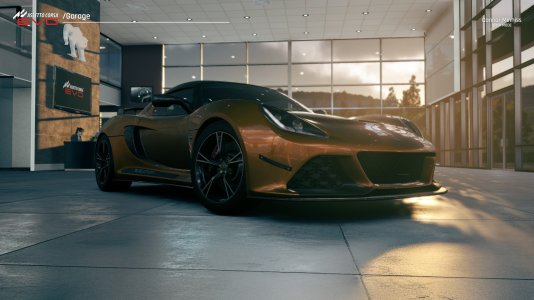
Taking great photos and screenshots in sim racing can be an entire hobby in itself, and with Kunos Simulazioni's Assetto Corsa EVO reaching v0.2, you can now show off the finer details of what this simulator can provide!
Assetto Corsa EVO is very early in its journey to becoming a fully-fledged simulator. Naturally, that means modes and features like the photo mode and replay system are still a heavy work in progress. But fear not—you can capture fantastic images with the current tools!

Toyota GR86. Image: Kunos Simulazioni
To get the best angles, Assetto Corsa EVO offers a range of preset cameras and variable or cinematic angles, which you can experiment with to find what works best for what you are trying to capture.

Chevrolet Camaro in the Assetto Corsa EVO garage. Image: Kunos Simulazioni
If you want fluid movement and lots of motion blur, you might struggle to replicate what other sims can offer, such as Automobilsita 2 with its in-depth photo mode, but it is certainly possible to give it a good go! After all, there is also the power of post-production editing until the tools are built into the sim in the future.
If you are new to screenshots and photo modes in sim racing, there is a helpful guide on which sims do what best and where to start right here on OverTake!

Ferrari GTB in the Assetto Corsa EVO dealership.
With static shots, taking your surroundings into context is vitally important. For the example above, the Ferrari is positioned so that the front of the car is being hit directly through the glass of the showroom window, creating light projections across the bodywork and onto the showroom floor.
If the same shot were to be recreated on a race track, the landscape would have to be taken into account, a replica of this photo but taken at Donington Park's crainer curves will look entirely different to it taken at the other end of the circuit at Coppice Corner.

The stunningly well-modelled tail lights of the Alfa Romeo Giulia GTAm in the rain at Imola
Composition within motorsport photography, and action shots especially, is crucial to telling the story of that photo. A car on track with a bit of motion blur doesn't capture the essence of racing like a Ferrari Challenge car up on two wheels as it desperately tries to escape the Mercedes AMG GT2 bearing down on it could do.
Assetto Corsa EVO has some significant limitations, especially when using the free camera. By default, pressing F2 whilst inside a replay will give you a 360 free cam to get the best angle of your car, but it is not entirely limitless.
Getting the smooth panning-style shots synonymous with motorsport photography will take more effort. Ensure the replay is playing at at least 1x speed, and you must be keen on your F12 key. Once you have the screenshot, take your image to Photoshop or any similar program, highlight your subject, and create a copy. Once done, blur the background subtly, and that is how you can best recreate a lot of motion blur in Assetto Corsa EVO, at least in v0.2.

Locking up a wheel in Assetto Corsa EVO makes for some great photos!
Once a proper photo mode is released with tools similar to other simulators, we will update this guide with everything you need to know about the game as it evolves!
Let us know in the comments below how you find the replay and screenshot tools, and any examples of what you have been able to shoot!
Assetto Corsa EVO is very early in its journey to becoming a fully-fledged simulator. Naturally, that means modes and features like the photo mode and replay system are still a heavy work in progress. But fear not—you can capture fantastic images with the current tools!
Toyota GR86. Image: Kunos Simulazioni
Sim racing and screenshots
The number one problem real photographers struggle with in motorsport photography is lighting and access. Motorsport can be dangerous as a photographer, primarily when concentrating on the camera and your subject rather than a potential racing car coming hurtling towards you out of control. The beauty of sim racing is that these risks are null and void, allowing you full access to every angle.To get the best angles, Assetto Corsa EVO offers a range of preset cameras and variable or cinematic angles, which you can experiment with to find what works best for what you are trying to capture.
Chevrolet Camaro in the Assetto Corsa EVO garage. Image: Kunos Simulazioni
If you want fluid movement and lots of motion blur, you might struggle to replicate what other sims can offer, such as Automobilsita 2 with its in-depth photo mode, but it is certainly possible to give it a good go! After all, there is also the power of post-production editing until the tools are built into the sim in the future.
If you are new to screenshots and photo modes in sim racing, there is a helpful guide on which sims do what best and where to start right here on OverTake!
How to get started in Assetto Corsa EVO
There are two main styles of photography and screenshots that you can have plenty of fun with within Assetto Corsa EVO: static and action. Static photography is when the subject is not moving in a setting such as a dealership showroom floor or a garage. This is your chance to get creative with angles, composition, and natural light.Ferrari GTB in the Assetto Corsa EVO dealership.
With static shots, taking your surroundings into context is vitally important. For the example above, the Ferrari is positioned so that the front of the car is being hit directly through the glass of the showroom window, creating light projections across the bodywork and onto the showroom floor.
If the same shot were to be recreated on a race track, the landscape would have to be taken into account, a replica of this photo but taken at Donington Park's crainer curves will look entirely different to it taken at the other end of the circuit at Coppice Corner.
Action photos
Once you understand the basic camera control in the Assetto Corsa EVO menus, make your way on track and set a few laps. Try to capture some photo-worthy moments. These could be oversteer, side-by-side racing, or something as simple as taking too much kerb or locking up.The stunningly well-modelled tail lights of the Alfa Romeo Giulia GTAm in the rain at Imola
Composition within motorsport photography, and action shots especially, is crucial to telling the story of that photo. A car on track with a bit of motion blur doesn't capture the essence of racing like a Ferrari Challenge car up on two wheels as it desperately tries to escape the Mercedes AMG GT2 bearing down on it could do.
Assetto Corsa EVO has some significant limitations, especially when using the free camera. By default, pressing F2 whilst inside a replay will give you a 360 free cam to get the best angle of your car, but it is not entirely limitless.
Getting the smooth panning-style shots synonymous with motorsport photography will take more effort. Ensure the replay is playing at at least 1x speed, and you must be keen on your F12 key. Once you have the screenshot, take your image to Photoshop or any similar program, highlight your subject, and create a copy. Once done, blur the background subtly, and that is how you can best recreate a lot of motion blur in Assetto Corsa EVO, at least in v0.2.
Locking up a wheel in Assetto Corsa EVO makes for some great photos!
Once a proper photo mode is released with tools similar to other simulators, we will update this guide with everything you need to know about the game as it evolves!
Let us know in the comments below how you find the replay and screenshot tools, and any examples of what you have been able to shoot!