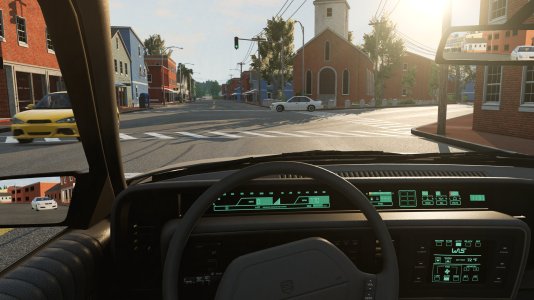
BeamNG.drive is one of the most popular racing or car-based games on Steam every month. How does it hold up in VR, though?
Beam Next Generation, the Garry's Mod of driving simulators, or, as it is better (and officially) known, BeamNG.drive, is a soft-body, physics-based vehicle simulation with an extremely realistic crash model and highly realistic driving physics. VR implementation came late in the game so I wanted to test it out to see if it is any good, and what settings make sense as a baseline for acceptable performance.
I'm generally unafraid of complex sim software like BeamNG - my sim racing roots are in titles like rFactor 1 & 2, and I regularly fiddle around in Assetto Corsa with graphics and mods, these sims take time and a good amount of patience to get set up - so my rage-quit threshold is pretty high! This is why I'm slightly embarrassed to admit BeamNG is something I got into very recently, just a few weeks ago. Testing it out has always been on the backlog for years, but I somehow never found the time or energy. Until now!
One of the main attractions is the crash physics, the only sim that tries to accurately simulates the crumple zone and all kinds of parts damage. Unlike most other sims, you have to really look after your car. Because even taking what you think is slight damage can adversely affect the car in surprising ways and make it un-driveable.
But BeamNG unfairly gets put into the category of just a crash simulator - I say unfair because there are endless possibilities of game modes and physics experimentation, and just plain driving and racing to keep you busy. Want to drive with moon gravity? Want to hurl a car off a cliff and watch the hurling ball of fire, or just walk around the car in VR, pop open the hood and check out the engine? Want to deliver pizzas in a quaint Italian village, why not?

Any sim racing title that gets blessed with VR, either at release or later in the development cycle, has my interest. I'm always keen to try things out in virtual reality just for the experience. How well a sim runs in VR will determine if I end up spending time on it regularly. The time investment to set everything up properly for a new-to-me and somewhat complex title like BeamNG is not negligible. It requires testing and fiddling from the very start, not to mention getting to know the interface, which is not that intuitive.
The additional challenge of getting an acceptable frame rate in VR, just to avoid a jarring laggy experience, is most often the real time consuming part. While guides created by other players are extremely valuable resources, nothing replaces doing some of your own testing. So I thought I'd share my first findings and hopefully provide a few useful insights when starting out.

Now we can get on with the VR focused bits. Although BeamNG has a very helpful documentation page for starting out, here are a few very basic steps before even getting started in VR that I've come across that might be helpful.
To show and keep the tacho, you need to click on the top bar > UI APPS > VIEW APPS > then uncheck the Tacho widget where it says "Hide in Cockpit mode".

Not sure why they chose to hide that by default but it is a bit confusing when starting out.


To help you with this, our very own @Connor Minniss wrote a useful guide on optimizing your FFB settings in BeamNG - check it out for optimal settings!
For sure worth a read if you can be bothered!
Spoiler alert: The game tends run best while in "re-projection", something I can confirm in my own testing. Why do I care and what does this mean, you might ask? The short of it is, if you have a moderate PC spec you'll want to set your headset to the highest refresh rate it has, for example 120hz for the PSVR2, because that refresh rate will be halved. So for 120hz you'll be running at 60 fps locked. If you set it to 90hz, well, you'll be getting a measly 45 fps.
Re-projection in BeamNG.drive basically equates to a much smoother experience with way with less judders and almost no dropped frames - can't drop what you don't have, am I right?
But seriously, my advice is to take the refresh rate hit at the expense of some visual crispness. I gave up trying to lower the graphics settings just to run at my headset's native refresh rate, even 90Hz (under 11ms) is almost impossible to sustain without constantly dropping frames. Dropped frames means very noticeable freezes, and in scenarios where there's a lot of car movement like off road, this will make you feel sick pretty quick!
I know what some of you VR veterans are saying: "This trade off is unacceptable! Re-projection is all things bad." I'm not at all a fan of it either and would never elect for it, however in BeamNG.drive, the re-projected image, with detail settings on high and full reflections, is arguably 10 times better than turning most settings down to low or off, which makes the whole scene look like Minecraft.
As a side note, although an important one, I also regularly test sims on the Oculus Quest 3 for comparison. For this test, I've skipped that as BeamNG recommends only using wireless VR with Quest because of "right eye stutter", which I can sadly confirm. That is a huge deal breaker. I have tried wireless and get all kinds of lags, stutters, and mushy steering input latency, so the Quest 3 did not come along for this one. I really hope this gets fixed in the near future.
Most settings need to be turned down or off to get under 11ms, therefore re-projection makes more sense as a compromise. The constant frame drops is clearly visible in the image below where I've set most every graphic setting to low or off, even when staying below 11ms.
Also easy to see in the image, the amount of detail lost in the graphics, which makes everything look dull and flat, not to mention all the pop-ins and texture weirdness it causes.

So with that, I have opted for these general Graphics settings in-game:


Side note: At some point the whole UI and HUD disappeared in VR for me! I was never able to get it to show again in the headset. Quite frustrating as I have to constantly lift the headset to use the UI. Could be a button I pressed accidentally.


For this guide, my focus is therefore mainly on the most commonly used in-game base maps and cars - and experimental rally stages of course, because rally! As with my last VR benchmarks on Assetto Corsa EVO I'm testing on the PSVR2, which has gloriously rich OLED displays. Below you will find some screenshots of the performance monitors for each map I'm testing on, which should give a rough idea of performance, but is by no means a very precise result. The objective here is to get a baseline and be able to enjoy BeamNG in VR without too many stutters and freezes.
A cross section of maps and stages makes sense. I decided on the following categories:


Observations:
Despite the jungle scene being very overloaded with leafy plants and trees, it is probably the worst case scenario in terms of the mix of shadows, lighting, reflections and textures, all close up and in abundance. However it still stays smooth thanks to steady old reprojection. The car movement on the other hand is so extreme even with lock to horizon at 75%, it is not ideal for those that suffer motion sickness easily. Thankfully I don't get motion sick in VR, but still, I'm not far off here!
Scenario: Jungle Gambler

Observations:
Similar to Mudslide Gladiator Scenario above, this scene has very dense foliage which starts to weigh on the output, when you add the AI cars to that, the performance starts to drop and you see more dropped frames at regular intervals. An occasional dropped frame is something I can live with, but it is not ideal.

Observations:
The desert scene runs really smooth, of course there is not much around to have to render, so not a shock. The very occasional dropped frame is all I noticed. I did manage to flip the car on its side and break the windshield, the desert looks quite stunning like that!

Observations:
City scenes in base game BeamNG look unsurprisingly basic, a bit flat and lifeless, but it still works to simply convey an urban environment. Framerate is stable but it struggles a bit the moment any other cars are around. I could imagine if a city scene is highly detailed it would really struggle to stay below the threshold before it starts dropping frames.
Scenario: Pizza Delivery

Observations:
How can I pass up delivering pizza in a quaint Italian village? No big performance issues, just a couple dropped frames, but I didn't notice any freezes; the scene is pretty basic and there are no other cars so it makes sense. Driving down the stairs at the end ala Jason Bourne, is all I ever needed to do in a sim!
Rally: SS Clyde Peak

Rally: SS Fatello-Norte

Rally: SS Howler Pass

Observations:
All the rally stages are a blast and overall performance is smooth with minimal dropped frames and no noticeable stutters. The handling of the cars is engaging and rewarding especially in hairpins where the cockpit rolls around you into and out of the turns.
Additionally the environments and textures are highly detailed, as compared to other older base content, and therefore beautiful when the sun is low. The way the light spreads across the landscapes is stunning and immersive.
For me Gran Turismo 7 with the PSVR2 is the only other sim where road car movement feels so spot on, the result while driving looks ultra realistic because of all the subtle visual cues the car gives back. So far, BeamNG is the only PC sim I've tried in VR that gives this same sense of 'movement familiarity' particular to road cars. Most PC sims running road cars visually seem way too abrupt and choppy in the way they move, and therefore less convincing.

So the immersion is there for sure, but if I have one thing I feel is really missing, that would be an in-car driver animation. In VR, as we all know, the driver animation is incredibly important that for feeling like you're in that car turning the wheel yourself, the driver hands become your hands. So not having any is something hard to get used to. It takes me back to Codemaster's first DiRT RallyVR years back, where if you enabled the driver animation cam it caused a huge performance drop. I did get used to the phantom empty car, but given the choice, I want some arms and hands!
As a side note / observation, I can see why it would be tricky in BeamNG.drive to include a driver, possibly because of the crash physics and the ethical question of what to do with a driver animation in a wrecked car.
Another aspect that's truly immersive that you don't see in many VR sims (aside from AC, which has a VR addons mod) is the car interaction in first person via the motion controllers or keyboard and mouse. You can walk around, open doors, pop the hood, trunk, hatch etc, even jump on your car and break the windshield and dent the hood. Of course I didn't do that! Walking around the car and literally hopping in and taking off is-just-cool.
The fact re-projection is a requirement for steady image quality is a point against it, but it won't not stop me driving BeamNG regularly. The day VR is further optimized (or I get a better GPU) I will gladly shut reprojection off for good!
YES!
Does it satisfy some need that is not already fulfilled by another sim out there?
My answer to that is: Probably! BeamNG is hard to compare to anything else, because there is hardly anything else like it.
What are your experiences in BeamNG.drive in VR? Did this guide help you? Let us know in the comments below and join the discussion in our BeamNG.drive forum!
Beam Next Generation, the Garry's Mod of driving simulators, or, as it is better (and officially) known, BeamNG.drive, is a soft-body, physics-based vehicle simulation with an extremely realistic crash model and highly realistic driving physics. VR implementation came late in the game so I wanted to test it out to see if it is any good, and what settings make sense as a baseline for acceptable performance.
I'm generally unafraid of complex sim software like BeamNG - my sim racing roots are in titles like rFactor 1 & 2, and I regularly fiddle around in Assetto Corsa with graphics and mods, these sims take time and a good amount of patience to get set up - so my rage-quit threshold is pretty high! This is why I'm slightly embarrassed to admit BeamNG is something I got into very recently, just a few weeks ago. Testing it out has always been on the backlog for years, but I somehow never found the time or energy. Until now!
BeamNG History
BeamNG.drive has been around since 2015. Since then, it has amassed a gargantuan player base that regularly sustains 20k daily concurrent players. And occasionally, it even came close to 30k all-time concurrent players in the Steam charts, a truly out of this world achievement for a simulation.One of the main attractions is the crash physics, the only sim that tries to accurately simulates the crumple zone and all kinds of parts damage. Unlike most other sims, you have to really look after your car. Because even taking what you think is slight damage can adversely affect the car in surprising ways and make it un-driveable.
But BeamNG unfairly gets put into the category of just a crash simulator - I say unfair because there are endless possibilities of game modes and physics experimentation, and just plain driving and racing to keep you busy. Want to drive with moon gravity? Want to hurl a car off a cliff and watch the hurling ball of fire, or just walk around the car in VR, pop open the hood and check out the engine? Want to deliver pizzas in a quaint Italian village, why not?
BeamNG.drive in VR
Official virtual reality support in BeamNG was only implemented in September of 2023. With VR compatibility come some very familiar challenges, mainly keeping performance from tanking. When compared to running on a flat screen, VR is vastly more resource intensive.Any sim racing title that gets blessed with VR, either at release or later in the development cycle, has my interest. I'm always keen to try things out in virtual reality just for the experience. How well a sim runs in VR will determine if I end up spending time on it regularly. The time investment to set everything up properly for a new-to-me and somewhat complex title like BeamNG is not negligible. It requires testing and fiddling from the very start, not to mention getting to know the interface, which is not that intuitive.
The additional challenge of getting an acceptable frame rate in VR, just to avoid a jarring laggy experience, is most often the real time consuming part. While guides created by other players are extremely valuable resources, nothing replaces doing some of your own testing. So I thought I'd share my first findings and hopefully provide a few useful insights when starting out.
My PC Specs
- Graphics Card: Nvidia 3080ti
- Processor: AMD Ryzen 7 7800X3D
- 32GB RAM
VR Headset
- Playstation VR2 with PC adapter
SteamVR Settings
- 60% resolution is the highest I could run BeamNG without causing frame drops
- Motion smoothing OFF
Nvidia Control Panel Settings
- Everything is left at default
Before Starting Up VR
This guide assumes you know how to set up BeamNG in general, map your controls, set up your wheel and force feedback (FFB), and navigate the menus a bit.Now we can get on with the VR focused bits. Although BeamNG has a very helpful documentation page for starting out, here are a few very basic steps before even getting started in VR that I've come across that might be helpful.
The HUD
It's pretty important to be able to see the virtual tacho in cockpit view. This not the default, and confusingly the tacho disappears once you start driving.To show and keep the tacho, you need to click on the top bar > UI APPS > VIEW APPS > then uncheck the Tacho widget where it says "Hide in Cockpit mode".
Not sure why they chose to hide that by default but it is a bit confusing when starting out.
Controller setup: Press Pause!
The very first thing I can recommend is to quickly learn to use the Pause button: the ESC key WILL NOT by default stop the game. This means in some cases just hitting ESC might leave your car rolling into a wall or ditch while you are messing around in the menus. On a direct drive wheel this can actually be quite dangerous! Opt to keep those precious opposable thumbs and get to know PAUSE, and preferably map it to a wheel button. I map PAUSE to the stick press on my Fanatec rim.Force Feedback
Again, if you're on a direct drive or a wheel that delivers a good amount of torque, keep the overall force LOW. I can't stress this enough. Even in game, BeamNG recommends to keep your thumbs out of the rim, so it must be for good reason! The FFB can spike abruptly and without much warning. In VR, this is even more important because of the lack of real-world visuals and subtle cues your wheel may give.To help you with this, our very own @Connor Minniss wrote a useful guide on optimizing your FFB settings in BeamNG - check it out for optimal settings!
In-Game Graphics Settings for VR
BeamNG has very nicely laid out documentation on their website with some VR optimization tips.For sure worth a read if you can be bothered!
Spoiler alert: The game tends run best while in "re-projection", something I can confirm in my own testing. Why do I care and what does this mean, you might ask? The short of it is, if you have a moderate PC spec you'll want to set your headset to the highest refresh rate it has, for example 120hz for the PSVR2, because that refresh rate will be halved. So for 120hz you'll be running at 60 fps locked. If you set it to 90hz, well, you'll be getting a measly 45 fps.
Re-projection in BeamNG.drive basically equates to a much smoother experience with way with less judders and almost no dropped frames - can't drop what you don't have, am I right?
But seriously, my advice is to take the refresh rate hit at the expense of some visual crispness. I gave up trying to lower the graphics settings just to run at my headset's native refresh rate, even 90Hz (under 11ms) is almost impossible to sustain without constantly dropping frames. Dropped frames means very noticeable freezes, and in scenarios where there's a lot of car movement like off road, this will make you feel sick pretty quick!
I know what some of you VR veterans are saying: "This trade off is unacceptable! Re-projection is all things bad." I'm not at all a fan of it either and would never elect for it, however in BeamNG.drive, the re-projected image, with detail settings on high and full reflections, is arguably 10 times better than turning most settings down to low or off, which makes the whole scene look like Minecraft.
As a side note, although an important one, I also regularly test sims on the Oculus Quest 3 for comparison. For this test, I've skipped that as BeamNG recommends only using wireless VR with Quest because of "right eye stutter", which I can sadly confirm. That is a huge deal breaker. I have tried wireless and get all kinds of lags, stutters, and mushy steering input latency, so the Quest 3 did not come along for this one. I really hope this gets fixed in the near future.
Most settings need to be turned down or off to get under 11ms, therefore re-projection makes more sense as a compromise. The constant frame drops is clearly visible in the image below where I've set most every graphic setting to low or off, even when staying below 11ms.
Also easy to see in the image, the amount of detail lost in the graphics, which makes everything look dull and flat, not to mention all the pop-ins and texture weirdness it causes.
So with that, I have opted for these general Graphics settings in-game:
Options > Display
- Mesh Quality HIGH
- Texture Quality HIGH
- Lighting Quality HIGH
- Shadow Resolution HIGH
- Shader Quality HIGH.
- Shadow Visibility ALL
- Shadow resolution Normal
- Anti-aliasing mode SMAA which is recommended and looks better than FXAA.
- Anisotropic Filtering 16x
- Ambient Occlusion: Normal
- Bloom is off: OFF I have never been a fan of bloom so mostly a personal visual preference
- Light rays: ON Super important for immersion
- Depth of Field: I systematically turn this OFF in most other titles. In BeamNG, however, DOF slightly blurs the textures when far away, making them less distracting when set to LOW.
- Dynamic reflections ON
- Detailed Mirrors OFF
- VR resolution 75% - I experimented with setting this higher and it caused stutters and dropped frames
UI Settings
Next, in the main menu, resize the UI. If you don't do this, while in VR the UI will be really far away with jaggy aliasing, and almost impossible to read the text. This took me a while to figure out.Width and Curve
Side note: At some point the whole UI and HUD disappeared in VR for me! I was never able to get it to show again in the headset. Quite frustrating as I have to constantly lift the headset to use the UI. Could be a button I pressed accidentally.
BeamNG.drive: How To Enable VR
- Start BeamNG via Steam
- Choose "Launch Vulkan" for VR!
- Once in game navigate to Display
- Scroll down to the section Virtual Reality
- Click Activate
- And click Understood on the "early access and experimental" warning!
BeamNG.drive VR: Testing & Impressions
So where to even start with some basic performance testing? With a sim as vast and complex as BeamNG.drive, the possibilities are endless. So many diverse combos to try, plus mods, traffic, various game game modes...For this guide, my focus is therefore mainly on the most commonly used in-game base maps and cars - and experimental rally stages of course, because rally! As with my last VR benchmarks on Assetto Corsa EVO I'm testing on the PSVR2, which has gloriously rich OLED displays. Below you will find some screenshots of the performance monitors for each map I'm testing on, which should give a rough idea of performance, but is by no means a very precise result. The objective here is to get a baseline and be able to enjoy BeamNG in VR without too many stutters and freezes.
A cross section of maps and stages makes sense. I decided on the following categories:
- Heavy foliage
- Desert
- City map
- The Experimental Rally Stages
The Testing "Scenarios"
Heavy Foliage
Scenario: Mudslide GladiatorObservations:
Despite the jungle scene being very overloaded with leafy plants and trees, it is probably the worst case scenario in terms of the mix of shadows, lighting, reflections and textures, all close up and in abundance. However it still stays smooth thanks to steady old reprojection. The car movement on the other hand is so extreme even with lock to horizon at 75%, it is not ideal for those that suffer motion sickness easily. Thankfully I don't get motion sick in VR, but still, I'm not far off here!
Scenario: Jungle Gambler
Observations:
Similar to Mudslide Gladiator Scenario above, this scene has very dense foliage which starts to weigh on the output, when you add the AI cars to that, the performance starts to drop and you see more dropped frames at regular intervals. An occasional dropped frame is something I can live with, but it is not ideal.
Desert / Open Landscape
Scenario: Desert RallyObservations:
The desert scene runs really smooth, of course there is not much around to have to render, so not a shock. The very occasional dropped frame is all I noticed. I did manage to flip the car on its side and break the windshield, the desert looks quite stunning like that!
City and Buildings
Scenario: Garage to Garage Delivery USAObservations:
City scenes in base game BeamNG look unsurprisingly basic, a bit flat and lifeless, but it still works to simply convey an urban environment. Framerate is stable but it struggles a bit the moment any other cars are around. I could imagine if a city scene is highly detailed it would really struggle to stay below the threshold before it starts dropping frames.
Scenario: Pizza Delivery
Observations:
How can I pass up delivering pizza in a quaint Italian village? No big performance issues, just a couple dropped frames, but I didn't notice any freezes; the scene is pretty basic and there are no other cars so it makes sense. Driving down the stairs at the end ala Jason Bourne, is all I ever needed to do in a sim!
Experimental Rally Stages
In anticipation of the new rally stages and further development announced in a sneak peek recently here at OverTake, it makes sense to try out the rally aspect of BeamNG. The developers seem to be really laying into the genre, and that is a good thing!Rally: SS Clyde Peak
Rally: SS Fatello-Norte
Rally: SS Howler Pass
Observations:
All the rally stages are a blast and overall performance is smooth with minimal dropped frames and no noticeable stutters. The handling of the cars is engaging and rewarding especially in hairpins where the cockpit rolls around you into and out of the turns.
Additionally the environments and textures are highly detailed, as compared to other older base content, and therefore beautiful when the sun is low. The way the light spreads across the landscapes is stunning and immersive.
Conclusion
The Driving Experience In VR
Aside from the visuals in VR, BeamNG's driving physics and car movement is quite unique, it demands respect and finesse. And VR really takes advantage of this particular aspect of the sim: as the car moves around you it just conveys so nicely what it does in real life. The feeling of inertia and sweeping motion on acceleration in turns really comes through visually.For me Gran Turismo 7 with the PSVR2 is the only other sim where road car movement feels so spot on, the result while driving looks ultra realistic because of all the subtle visual cues the car gives back. So far, BeamNG is the only PC sim I've tried in VR that gives this same sense of 'movement familiarity' particular to road cars. Most PC sims running road cars visually seem way too abrupt and choppy in the way they move, and therefore less convincing.
The Damage Model
Damage is something I don't overly fixate on when driving a sim. In BeamNG, however, when you have a shunt any level of damage looks hauntingly realistic. You're trapped inside that cockpit with nowhere to move. Drive into a tree or a concrete barrier and watch as the entire front end come towards you crumpling in. Big crashes are a very jarring experience at first - especially if you have ever been in any kind of real car accident. Damage like this adds to the sense of realism, and danger.What It Lacks Specifically For VR
So the immersion is there for sure, but if I have one thing I feel is really missing, that would be an in-car driver animation. In VR, as we all know, the driver animation is incredibly important that for feeling like you're in that car turning the wheel yourself, the driver hands become your hands. So not having any is something hard to get used to. It takes me back to Codemaster's first DiRT RallyVR years back, where if you enabled the driver animation cam it caused a huge performance drop. I did get used to the phantom empty car, but given the choice, I want some arms and hands!
As a side note / observation, I can see why it would be tricky in BeamNG.drive to include a driver, possibly because of the crash physics and the ethical question of what to do with a driver animation in a wrecked car.
User Friendliness
Lastly, to the overall user friendliness in VR. BeamNG's UI is tricky to navigate through and understand the basic settings at first, but not impossible. Once you know what you're doing it's pretty straight forward. Admittedly I did have to watch multiple YouTube videos to piece together some of the basics.Another aspect that's truly immersive that you don't see in many VR sims (aside from AC, which has a VR addons mod) is the car interaction in first person via the motion controllers or keyboard and mouse. You can walk around, open doors, pop the hood, trunk, hatch etc, even jump on your car and break the windshield and dent the hood. Of course I didn't do that! Walking around the car and literally hopping in and taking off is-just-cool.
Performance
Performance-wise it would be a bit unfair to rate a 10 year-old game on today's VR standards. On the other hand, VR wasn't added that long ago, so it might be further optimized or get additional options. As of right now, VR is still more on the experimental side, as the in-game pop up politely warns you.The fact re-projection is a requirement for steady image quality is a point against it, but it won't not stop me driving BeamNG regularly. The day VR is further optimized (or I get a better GPU) I will gladly shut reprojection off for good!
Final Word
Is BeamNG.drive a fun, worthwhile, rewarding experience in VR?YES!
Does it satisfy some need that is not already fulfilled by another sim out there?
My answer to that is: Probably! BeamNG is hard to compare to anything else, because there is hardly anything else like it.
What are your experiences in BeamNG.drive in VR? Did this guide help you? Let us know in the comments below and join the discussion in our BeamNG.drive forum!